How to Post Code in Threads
It's important to use the correct formatting when sharing code in your thread. Properly formatted code is easier to read and understand, which helps others troubleshoot and provide better support.
Code Forum supports two ways to display code using BBCode:
- Single-line code
- Multi-line code blocks
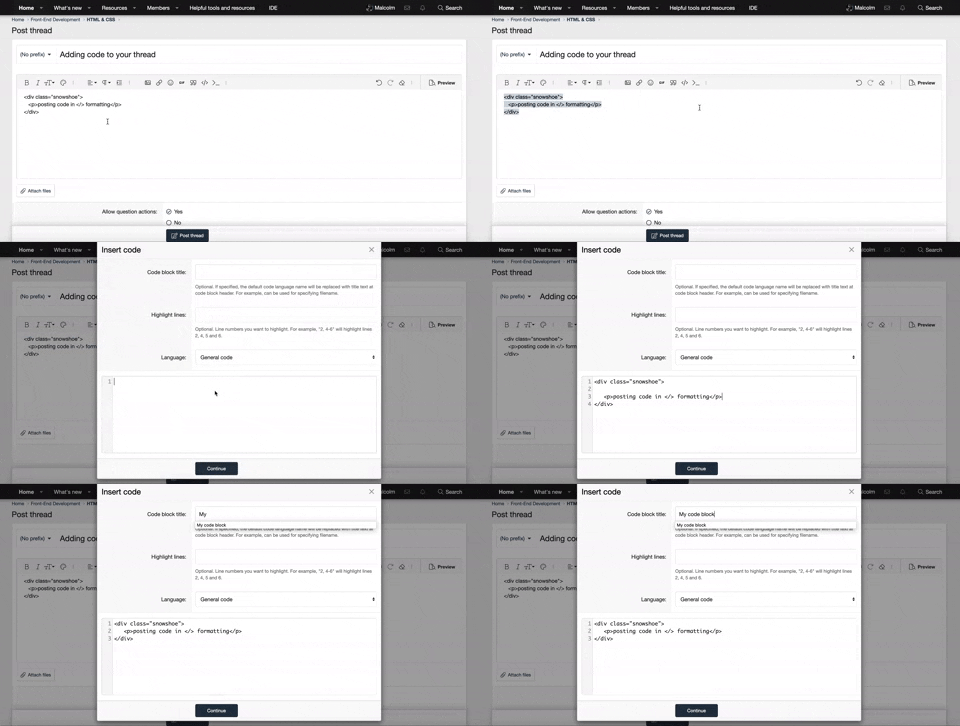
Here’s a step-by-step guide for each option, along with a demonstration GIF to help you visualize the process.
Using the Code Buttons
Single-Line Code
Use this when you want to highlight one line of code (e.g., a single HTML tag or command).
Steps:
- On the editor toolbar, Click the three-round dot icon.
- Select
>_Inline Code. - Next, a BBCode ICODE will appear.
- Place your single line code between the tags.
Multi-Line Code
- On the editor toolbar, Click the three-round dot icon.
- Select
</>Code. - Next, a prompt will appear.
- Fill out the fields and the type of code if required. Then place/write your code in the large text area and click continue.